Free Facebook Share Link Generator
Build a Facebook share link for any page, then copy it as a URL, HTML anchor, or Markdown. 100% in your browser, no sign-up required.
Facebook's sharer accepts only the page URL. The headline, description, and image shown in the share dialog come from your page's Open Graph tags (og:title, og:description, og:image), not from a custom quote. There is no longer a working quote parameter.
Track clicks on your Facebook share link
Wrap your share link in a Flyn short link to see how many people clicked your Facebook button, from where, on what device.
How to Create a Facebook Share Link in 3 Steps
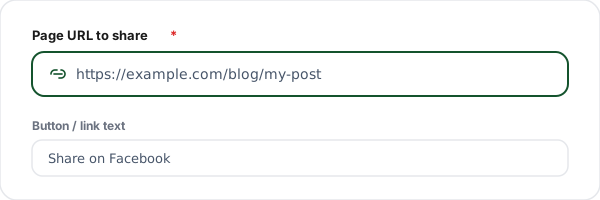
Paste the page URL
Paste the full URL of the page you want shared on Facebook. Optionally set the button text used in the HTML and Markdown output.
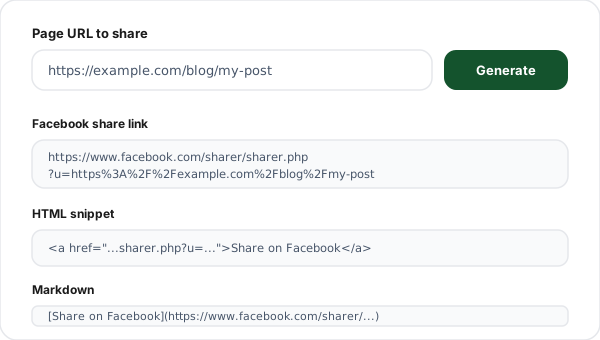
Generate the share link
Click Generate. We build the Facebook sharer.php link and automatically URL-encode your page into the u parameter so nothing breaks.
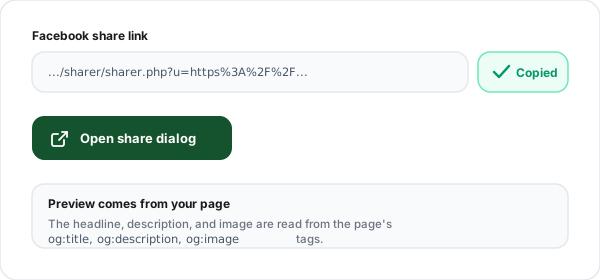
Copy the link, HTML, or Markdown
Copy the share URL, the ready-to-paste HTML anchor, or the Markdown snippet, or click Open share dialog to test it live on Facebook.
What is a Facebook Share Link?
A Facebook share link is a URL that opens Facebook's share dialog with one of your pages already loaded, so a visitor only has to add a comment and post it to their timeline. The supported format today is https://www.facebook.com/sharer/sharer.php?u=URL, where URL is the page you want shared.
It is the simplest possible "Share on Facebook" button: no app ID, no JavaScript SDK, no account. You point an ordinary anchor tag at the sharer URL and you are done. That is why it is still the default choice for blogs, landing pages, newsletters, and documentation, places where loading Meta's SDK would be overkill.
The one thing to understand clearly: you cannot set the preview text or image from the share link. Facebook removed the quote, title, description, and picture parameters long ago. The headline, snippet, and thumbnail in the share card are pulled live from the destination page's Open Graph tags (og:title, og:description, og:image). To change how a link looks when shared, edit those meta tags on the page, not the share URL.
Our generator builds only what genuinely works: the single u= parameter, with your URL safely encoded so a page that already has its own query string (like UTM tags) does not break the share link.
How to Control Your Facebook Share Preview
Since the share link cannot carry custom text or images, the preview card is entirely determined by your page's Open Graph meta tags. Add these three to the <head> of the page you are sharing:
<meta property="og:description" content="One-line summary" />
<meta property="og:image" content="https://example.com/card.png" />
Use an og:image at 1200x630 pixels for a clean large card; smaller images may render as a tiny square or be dropped entirely. If you change a page's Open Graph tags after Facebook has already cached it, run the URL through Facebook's Sharing Debugger and click Scrape Again to force a fresh fetch.
Finally, if you want to measure traffic from Facebook, tag the page URL with UTM parameters (for example ?utm_source=facebook&utm_medium=social) before you paste it into the generator. That tagged URL becomes the shared link, so every visit shows up correctly in your analytics.
Share Link vs Facebook SDK Share Dialog
Two ways to add Facebook sharing. The plain share link needs zero setup; the SDK Share Dialog adds callbacks at the cost of an app ID and JavaScript.
| Aspect | Share Link (sharer.php) | SDK Share Dialog |
|---|---|---|
| Setup required | None, plain URL | Facebook app ID + JS SDK |
| Controls preview text/image | No (reads page Open Graph) | No (reads page Open Graph) |
| Pre-fill user comment | Not possible | Not possible |
| Works without JavaScript | Yes | No |
| Click callbacks | No | Yes |
| Best for | Blogs, landing pages, emails | Apps needing share events |
Common Facebook Share Link Use Cases
Blog post "Share" buttons
Add a "Share on Facebook" button at the top or bottom of every article so readers can post it to their timeline in one tap.
Landing page social proof
Put a share link on product and campaign landing pages to turn happy visitors into distribution, no SDK or app ID required.
Email newsletter CTAs
Include a "Share this with your network" link in newsletters that opens Facebook with your latest issue pre-loaded.
Event and webinar pages
Let attendees invite friends by sharing the event page; Facebook pulls the event image and details from your Open Graph tags.
Documentation and help articles
Add a quiet share link on docs so users can pass a useful guide to teammates without copy-pasting the URL.
Affiliate and referral pages
Combine the share link with UTM-tagged URLs so every Facebook click is attributed back to the right campaign in analytics.
Why Use Flyn's Share Link Generator?
100% Client-side
The share link is built in your browser. Your URL never touches our servers, no account needed.
Correct encoding
Your page URL is run through encodeURIComponent, so UTM tags and query strings never break the link.
URL, HTML + Markdown
Copy the raw share URL, a ready-to-paste HTML anchor, or a Markdown link, whatever your stack needs.
Honest about limits
We build only the supported sharer parameter and explain exactly how the preview card is generated.
Frequently Asked Questions
What is a Facebook share link?
A Facebook share link is a special URL that opens Facebook's share dialog with a page already loaded, so a visitor only has to add a comment and post. The working format today is https://www.facebook.com/sharer/sharer.php?u=URL, where URL is the page you want shared. When someone clicks it, Facebook fetches that page's Open Graph tags to build the preview card. You add this link behind a "Share on Facebook" button on your site.
What is the correct Facebook sharer URL format?
The only format Facebook officially supports now is https://www.facebook.com/sharer/sharer.php?u=ENCODED_URL. The u parameter holds the page you want people to share, URL-encoded so characters like ? and & inside your link do not break the share URL. Our generator builds this exact string for you with encodeURIComponent applied automatically. The older /sharer.php (without /sharer/) path still redirects, but the /sharer/sharer.php path is the canonical one.
Can I set the share text, title, or image with a quote parameter?
No. Facebook removed the quote, title, description, caption, and picture parameters from the sharer years ago, and they are silently ignored today. The headline, description, and image in the share dialog are pulled live from the destination page's Open Graph tags. To control how your link looks when shared, edit the page's og:title, og:description, and og:image meta tags, not the share URL.
How does Facebook decide what preview image and text to show?
Facebook's crawler reads the shared page's Open Graph meta tags: og:title for the headline, og:description for the snippet, and og:image for the thumbnail. If those are missing, it falls back to the page <title>, the first usable paragraph, and the first large image it can find. Setting an og:image at 1200x630 pixels gives you a clean large-format card. Pages with no usable image show a plain text-only link.
Why is my Facebook share preview blank or showing the wrong image?
Almost always it is an Open Graph problem on the destination page, not the share link. Common causes: missing og:image, an og:image that is too small (under 200x200), an image behind a login or robots block, or a stale cache. Run the page through Facebook's Sharing Debugger and click "Scrape Again" to force a fresh fetch. The share link itself is just a pointer to that page.
Do I need to URL-encode the link I put in the sharer?
Yes, and our tool does it for you. The page URL goes in the u parameter, and if your URL contains its own query string (for example ?utm_source=facebook), those characters must be percent-encoded so Facebook reads the whole thing as one value. Without encoding, everything after the first & would be dropped. We run encodeURIComponent on your URL automatically before building the share link.
Will the Facebook share link work on mobile?
Yes. On mobile browsers the sharer.php link opens Facebook's mobile share flow, and if the Facebook app is installed it usually hands off to the app's native share sheet. The link is a standard https URL, so it works in Safari, Chrome, in-app browsers, email, and SMS. For the smoothest mobile experience, also consider the native Web Share API in your own code, but the sharer link is the universal fallback.
Can I track how many people click my Facebook share link?
Not with the raw sharer URL, Facebook does not report clicks on it. The reliable way is to wrap the share link (or, better, add UTM parameters to the page URL inside the u parameter) so your analytics attributes the traffic. Wrapping the share link in a Flyn short link gives you click counts, device, and location for the button itself, separate from the page views Facebook sends.
Should I add UTM parameters to the shared URL?
Yes, if you want to measure traffic that comes back from Facebook. Add utm_source=facebook&utm_medium=social&utm_campaign=yourcampaign to the page URL before you paste it into the generator. That tagged URL becomes the u value, so every visit Facebook sends is labelled in Google Analytics. Build the tagged URL first with a UTM builder, then generate the share link from it.
Is sharer.php deprecated or going away?
The sharer.php endpoint is not officially deprecated and is still widely used, but Meta has steadily trimmed its parameters and steers developers toward the Facebook SDK's Share Dialog for richer control. For a simple "share this page" button on a website, sharer.php is the simplest approach that works without loading Facebook's JavaScript SDK or registering an app. We build the supported single-parameter form.
What is the difference between a share link and the Facebook Share button SDK?
The share link (sharer.php) is a plain URL anyone can use with no setup, no app ID, and no JavaScript. The Facebook SDK Share Dialog is a JavaScript component that requires a registered Facebook app ID and loads Meta's SDK, but offers tighter integration and callbacks. For most blogs, landing pages, and emails, the share link is the right tool. Use the SDK only when you need programmatic callbacks.
Can I pre-fill a Facebook message or post body instead?
No, the sharer endpoint cannot pre-fill the user's comment, and there is no working parameter for it. The user types their own caption in the share dialog. If you need to pre-fill a message in a chat instead of a public post, use Facebook Messenger's send link or the Web Share API, those are different flows from sharing a link to your timeline.
Does this tool store or send my URL anywhere?
No. The Facebook share link is assembled entirely in your browser with JavaScript, your URL never touches our servers. Your generation history is saved only in your browser's localStorage and you can clear it any time. There is no account, no tracking pixel on the output, and no sign-up required to use the generator.
Related Tools
LinkedIn Share Link Generator
Build a LinkedIn share link for any page and copy it as a URL, HTML, or Markdown.
Click to Tweet Link Generator
Create a pre-filled tweet link so readers can post your quote to X in one tap.
URL Shortener
Shorten your share link and track clicks: how many, from where, on what device.
WhatsApp Link Generator
Create wa.me click-to-chat links with pre-filled messages for sharing pages.
Ready to level up your links?
Use our free tools to generate share links for every platform, then wrap them in Flyn short links to see how many people actually click your Facebook, LinkedIn, and X buttons.