Free Base64 Encoder/Decoder
Encode text to Base64 or decode Base64 strings instantly. URL-safe variant and Unicode/emoji support, 100% in your browser.
Sharing long Base64 data URIs?
Flyn turns huge data-URI links into clean branded short links with click analytics and QR codes.
How to Encode or Decode Base64 in 3 Steps
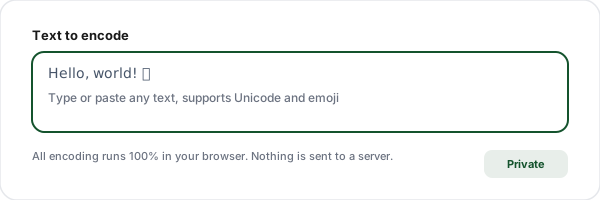
Paste your input
Type or paste the text you want to encode, or the Base64 string you want to decode. The tool handles full Unicode including emoji and non-Latin scripts.
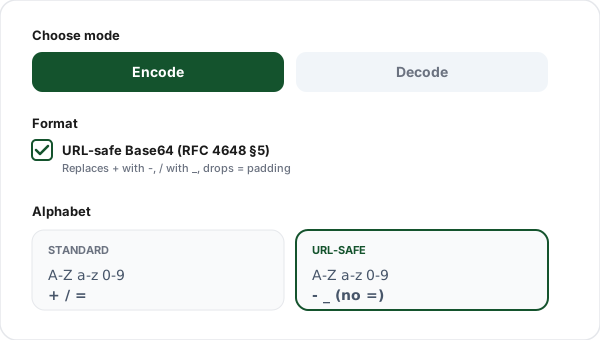
Choose encode or decode
Switch between Encode and Decode modes. Toggle URL-safe Base64 (RFC 4648) when your output will appear in a URL, query parameter, or filename.
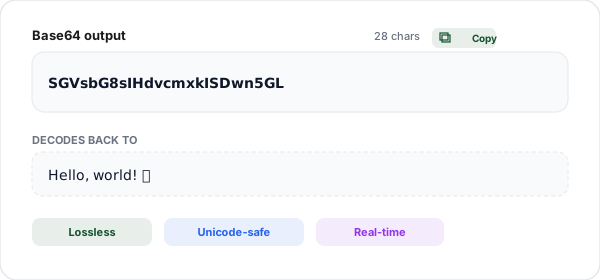
Copy the result
Output appears instantly. Click copy to paste into your code, API call, or email. Nothing ever leaves your browser, encoding runs fully client-side.
What is Base64 Encoding?
Base64 is a binary-to-text encoding scheme that represents any data, text, images, files, as a string of 64 printable ASCII characters. The scheme takes 3 bytes of input (24 bits) and splits them into 4 chunks of 6 bits each. Each 6-bit chunk maps to one character in the Base64 alphabet, producing output that is always ~33% larger than the input.
Base64 was designed in the 1980s for email attachments, back when SMTP could only reliably carry 7-bit ASCII text. Attaching a binary file, a photo, a PDF, required converting the bytes into characters that would survive every server hop intact. Today, Base64 has outgrown email and shows up everywhere text-only channels need to carry binary: JSON APIs, data URIs in HTML/CSS, JWT tokens, configuration files, and cryptographic key exchange formats.
Despite its ubiquity, Base64 is frequently misunderstood. It is not encryption: anyone with the Base64 string can decode it using any standard decoder. Never use Base64 to protect passwords, API keys, or sensitive data. If you need secrecy, use real cryptographic primitives, AES for confidentiality, HMAC for integrity, bcrypt or argon2 for password hashing. Base64 is purely about format, turning bytes into printable characters and back.
When Should You Use Base64?
Data URIs in HTML/CSS
Embed small images or fonts directly as data:image/png;base64,... to eliminate extra HTTP requests for icons and decorative images.
JSON API payloads
JSON cannot carry raw binary. Base64 lets you encode PDFs, images, or signatures and transmit them as string fields in API requests and responses.
JWT tokens
JSON Web Tokens use Base64URL (URL-safe Base64) to encode the header and payload. The three parts are separated by dots, decode each to inspect claims.
HTTP Basic Auth
The Authorization header encodes username:password as Base64. This is NOT encryption, always use HTTPS to protect Basic Auth credentials in transit.
Email attachments (MIME)
SMTP only guarantees 7-bit ASCII. MIME encodes binary attachments as Base64 so they survive mail servers that would otherwise corrupt binary data.
Database binary storage
Stores like localStorage, Redis, or some NoSQL databases only accept strings. Base64 lets you serialize binary data for these stores.
Standard Base64 vs URL-safe Base64
Two Base64 variants exist. Standard Base64 (RFC 2045) uses + and /; URL-safe Base64 (RFC 4648 §5) replaces them with - and _. Pick the right variant for where your output will land.
| Feature | Standard Base64 | URL-safe Base64 |
|---|---|---|
| Character set | A-Z, a-z, 0-9, +, / | A-Z, a-z, 0-9, -, _ |
| Padding | Uses = (required for length divisible by 4) | Often omitted (especially in JWT) |
| Safe in URLs? | No, needs percent-encoding | Yes, drop-in safe |
| Safe in filenames? | No, / is a path separator | Yes, drop-in safe |
| Used in | Email (MIME), HTTP Basic Auth, data URIs | JWT, OAuth, query params, URL slugs |
Why Use Flyn's Base64 Tool?
100% Client-side
All encoding happens in your browser. Your data never touches our servers, safe for sensitive payloads.
Instant conversion
Real-time as you type. No submit button, no round trip, no waiting.
URL-safe + Unicode
Toggle Base64URL for safe use in URLs. Full Unicode support including emoji and CJK scripts.
No sign-up
Unlimited encoding and decoding. No account, no email, no limits.
Frequently Asked Questions
What is Base64 encoding?
Base64 is a binary-to-text encoding scheme that converts any data, text, images, files, into a string of 64 printable ASCII characters (A-Z, a-z, 0-9, +, /). It was originally designed for email attachments where only ASCII could be transmitted safely, but is now used everywhere: data URIs, JWT tokens, API payloads, and storing binary data in JSON. Despite the name, Base64 is NOT encryption, anyone can decode it, and it provides zero security.
How does Base64 work?
Base64 takes 3 bytes (24 bits) of input and splits them into 4 chunks of 6 bits each. Each 6-bit chunk (0-63) maps to one of 64 printable characters. The result is always ~33% longer than the input. If the input length is not divisible by 3, one or two "=" padding characters are added to the end to make the output length a multiple of 4.
Why would I use Base64?
Common uses include: (1) Embedding small images directly in HTML/CSS as data URIs, avoiding extra HTTP requests. (2) Sending binary data through text-only protocols like email or JSON APIs. (3) Encoding JWT payloads (Base64URL variant). (4) Storing binary blobs in databases that only accept strings. (5) Basic HTTP authentication (username:password in the Authorization header). (6) Obfuscating data from casual inspection, but never as security.
What is the difference between standard Base64 and URL-safe Base64?
Standard Base64 uses + and / characters, which have special meanings in URLs (+ means space, / separates path segments). URL-safe Base64 (Base64URL, per RFC 4648) replaces + with - (hyphen) and / with _ (underscore), making the output safe to use in URLs, query parameters, or filenames without any additional escaping. URL-safe Base64 often also omits the = padding. Use URL-safe when your Base64 will appear in a URL or filename; use standard otherwise.
Is Base64 encryption? Is it secure?
No, Base64 is NOT encryption. It is a reversible encoding, anyone with the Base64 string can decode it back to the original data using any Base64 decoder (including this one). Do not use Base64 to "hide" passwords, API keys, or sensitive data. If you need security, use real encryption like AES, or hashing like SHA-256. Base64 is purely for format conversion, not confidentiality.
How much does Base64 encoding increase data size?
Base64 encoding increases data size by approximately 33% (the output is 4/3 the input length, plus padding). For every 3 bytes of input, you get 4 bytes of Base64 output. A 1 KB file becomes roughly 1.37 KB of Base64. If you gzip before Base64, you can offset some of the size increase for highly compressible data. Avoid Base64-encoding large files that will be transmitted over bandwidth-limited connections.
Can Base64 encode binary files like images or PDFs?
Yes, Base64 was designed for exactly this purpose. You can encode any binary file (images, PDFs, audio) into a Base64 string to embed in JSON, HTML data URIs, or text-only APIs. However, the 33% size overhead makes Base64 inefficient for large files, streaming binary or using multipart/form-data is usually better. This tool is designed for text input; to encode binary files, use a browser tool that supports FileReader or a CLI utility like base64.
Does Base64 handle Unicode characters and emoji?
Yes. This tool handles full Unicode including emoji, CJK characters, and combining marks. Internally, the input text is first encoded to UTF-8 bytes, then those bytes are Base64-encoded. This is the safest way to Base64 any text because it avoids the mojibake issues that plague naive Base64 implementations when handling non-ASCII input. For example, the emoji "😀" becomes "8J+YgA==" in Base64.
What do the = (equals) characters at the end of Base64 mean?
The = characters are padding. Base64 encodes in groups of 3 input bytes → 4 output characters. If the input length is not divisible by 3, the output is padded with = to reach a multiple of 4. One = means the last input group had 2 bytes; two == means 1 byte. Some implementations (especially Base64URL in JWT) omit padding entirely. When decoding, most decoders (including this tool) accept both padded and unpadded input.
Is it safe to put standard Base64 in a URL?
Not without percent-encoding. Standard Base64 contains + and / which have special meanings in URLs, and = which can cause parsing issues. For URLs, always use URL-safe Base64 (Base64URL) which replaces + with -, / with _, and often drops the = padding. Alternatively, percent-encode the standard Base64 string. This tool outputs both variants so you can pick the right one for your context.
How do I decode Base64 in JavaScript, Python, or shell?
JavaScript (browser): atob(str) decodes, btoa(str) encodes, ASCII only, use TextDecoder/TextEncoder for Unicode. Node.js: Buffer.from(str, "base64").toString() decodes, Buffer.from(str).toString("base64") encodes. Python: base64.b64decode(str) / base64.b64encode(bytes). For URL-safe: base64.urlsafe_b64decode. Shell: echo "text" | base64 / echo "SGVsbG8=" | base64 -d. This tool does all of these correctly including Unicode.
Does this tool send my data to a server?
No. All Base64 encoding and decoding happens 100% in your browser using native JavaScript APIs (TextEncoder, btoa, atob). Your input never leaves your device, and nothing is logged or stored on our servers. The optional history feature uses localStorage, which stays on your browser only. This makes the tool safe for sensitive data, internal API payloads, and anything you would not want to send to a third party.
Related Tools
URL Encoder/Decoder
Percent-encode URLs and query parameters. Supports encodeURIComponent, encodeURI, and Base64.
Slug Generator
Convert any text into clean, SEO-friendly URL slugs with unicode transliteration.
Meta Tag Generator
Generate SEO meta tags, Open Graph, and Twitter Cards with live Google SERP preview.
URL Cleaner
Strip UTM parameters, fbclid, gclid, and other tracking tags from URLs.
Ready to level up your links?
Use our free tools to encode, decode, and audit, then create powerful branded short links with Flyn. Click counts and QR codes on the free plan; full analytics and custom domains on Pro.