Free Threads Share Link Generator
Build a Threads compose link that opens with your post already written. Add a URL, watch the 500 character counter, then copy the link, the HTML, or the Markdown. All in your browser.
The counter measures this box only, so a URL you type in here counts like any other characters. A link added below is sent as the separate url parameter and is not added to the count.
Sent as the url parameter Meta documents for a link attachment, percent-encoded on its own. We do not repeat it inside your copy.
The link is the half you can actually measure.
An intent link is an ordinary link to threads.com, so it gives you no click data of its own. Shorten the destination with Flyn before you paste it in and you get real click counts on every tap, plus a tidier link if it ends up inside the copy.
How to Build a Threads Share Link in 3 Steps
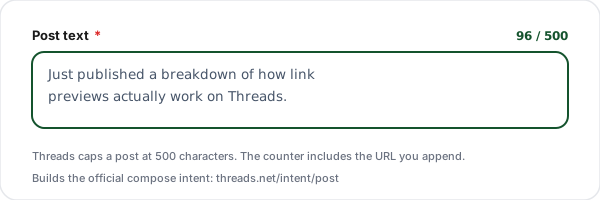
Write the post text
Type the copy you want sitting in the composer when someone clicks. The counter tracks your 500 character budget live and warns you before you run out of room.
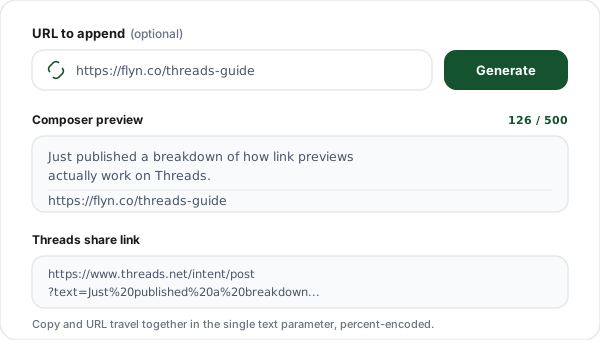
Add the link attachment
Paste an optional destination link. We pass it as the url parameter Meta documents for a link attachment, percent-encoded on its own, so it is not duplicated inside your copy.
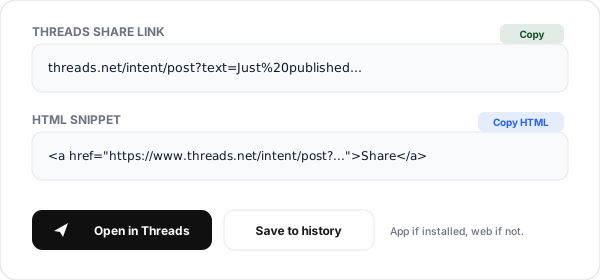
Copy the link or open Threads
Grab the raw intent link, a ready HTML anchor, or a Markdown snippet. Hit Open in Threads to check the draft yourself before you publish the button anywhere.
What is a Threads Share Link?
A Threads share link is a compose intent: an ordinary web URL that, when clicked, opens the Threads composer with text already in it. The shape is https://www.threads.com/intent/post?text=.... It is not an API, not a bot, and not something you register for. It is a link, and anyone can publish one.
The value of a compose intent is entirely about friction. Asking someone to "share this on Threads" means asking them to switch apps, remember what you wanted said, find the URL, and type it out. An intent link collapses all of that into one tap and hands them a draft. They still edit it, they still choose whether to post, and nothing publishes without them.
The design detail worth internalising is which parameters exist. Meta documents six on the post intent, and two of them do the work of a share button: text for the copy and url for the link attachment, described in the Web Intents reference as "Optional. The URL for an optional link attachment." This generator builds both, encoded separately, so your copy does not carry a raw URL and the counter charges you only for the words you wrote.
An intent link tells you nothing about who used it. If you need to measure a share campaign, the measurable surface is the destination URL inside the post, not the intent link itself. That is the gap a short link fills.
The Threads Intent Parameters
Meta publishes the full set in its Web Intents reference: six optional parameters on the post intent. This generator builds the two a share button needs, text and url, and the rest you can append to the link by hand.
| Parameter | Status | What it does | Example |
|---|---|---|---|
| text | Optional, we build it | Meta describes it as "Optional. The text that the post dialog should be prefilled with." We percent-encode your copy into it. | ?text=New%20post%20is%20live |
| url | Optional, we build it | Meta describes it as "Optional. The URL for an optional link attachment." This tool passes your destination here rather than burying it in the copy. | &url=https%3A%2F%2Fexample.com |
| tag | Optional, append by hand | Meta: "Optional. The topic tag that the post dialog should be prefilled with." It notes that newlines, tabs, periods and ampersands are not allowed in topic tags, and that the maximum length of a valid one is 50 characters. | &tag=Threads |
| reply_control | Optional, append by hand | Meta: "Optional. The initial audience that is allowed to reply to a post." The documented values are everyone, accounts_you_follow, mentioned_only and followers_only. | &reply_control=followers_only |
| reply_post_shortcode | Optional, append by hand | Meta: "The shortcode of the parent post that you are replying to. When this parameter is included, it will open the Threads post composer in reply mode with the parent post visible." | &reply_post_shortcode=SHORTCODE |
| quote_post_shortcode | Optional, append by hand | Meta: "The shortcode of the post that is being quoted. When this parameter is included, it will open the Threads post composer with the quoted post attached." | "e_post_shortcode=SHORTCODE |
| image / video | Not documented | Not among the six parameters Meta documents on the post intent, so this generator has nothing to pass. Add media in the composer, or publish through the official API. | n/a |
Host note: we output threads.com, the host in Meta's documented URL format. The older threads.net answers this path with a 301 redirect to threads.com rather than serving it directly (measured 12 August 2026), so a threads.net link still reaches the composer but pays an extra hop. Expect a login step either way: measured the same day, a signed-out request to the threads.com intent path answered with a 302 to the Threads login page, with the query string preserved through the bounce.
The 500 Character Budget
Meta documents the cap under Limitations in the Threads API docs: "Text posts are limited to 500 characters." The same section adds: "Emojis are counted as the number of UTF-8 bytes." (developers.facebook.com/docs/threads/posts). Going over is not a plain refusal. The official @threads account posted on 7 May 2026: "On mobile, when you paste a block of text longer than 500 characters into a new post, we'll now automatically break it up into multiple posts for you." (threads.com/@threads/post/DYCkTAQAKOl). Meta's newsroom announced in September 2025 that a post can also carry attached long-form text of up to 10,000 characters. Our counter measures the text box against 500 and treats an emoji as one unit.
| Element | Counts? | Detail |
|---|---|---|
| Post copy | Yes | Every character, including spaces and line breaks. |
| Emoji | Yes, as 1 | Our counter reads most emoji as one unit, though a flag or a skin-tone emoji reads as two. Meta documents a different rule again: "Emojis are counted as the number of UTF-8 bytes." |
| A URL typed into your copy | Yes | Characters like any other, so a 90 character URL costs 90 against the counter. |
| The link attachment | Not in the text value | It rides in the documented url parameter, outside the text box our counter measures. |
| @mentions and #tags in the copy | Yes | Characters like any other. For a topic tag, Meta documents a separate tag parameter instead. |
Links are the practical squeeze whenever they sit inside the copy. Every character of a URL you type into the text box counts, so a tracked campaign URL with UTM parameters can burn 120 of your 500 before you have written a word. This generator keeps your destination out of the copy by passing it in the url parameter, and shortening that destination is still a high leverage edit: it keeps the attachment tidy and, as a side effect, gives you click data of your own.
Note that the encoded link is much longer than the post it produces. A 200 character draft can easily become a 400 character intent URL once spaces, line breaks, and punctuation are percent-encoded. That is normal encoding, not corruption: the counter measures your decoded copy, not the encoded URL you copy out. Only worry about intent URL length if you are putting it somewhere with its own cap, such as a QR code.
Share Link Generator vs Threads Link Shortener
These two Flyn pages get confused constantly, so here is the clean split. This page builds the link that writes the post. The Threads Link Shortener shortens the link that goes inside the post. Most good campaigns use both.
| Aspect | Share Link Generator | Threads Link Shortener |
|---|---|---|
| What it produces | A link that opens the Threads composer | A short link you paste into a post |
| Who clicks it | Your audience, to help them post | Your audience, to reach the destination |
| Where it lives | On your site, in emails, on buttons | Inside the Threads post itself |
| Click analytics | None from the intent link itself | Full click counts on every tap |
| Character cost | Not posted, so zero | Short, so it frees up characters |
| Use both together | Shorten first, then generate | Feed the short link into the generator |
The combined workflow takes about a minute. Shorten your destination on the shortener page, paste the resulting short link into the URL field above, write your copy, and ship the generated intent link as your share button. Anyone who posts the draft unedited carries your trackable link, and you can see the clicks without asking anyone for a screenshot.
Threads Share Link Use Cases
Share on Threads buttons
Put a real share button on every article with the headline and the canonical URL pre-written, so readers post in one tap instead of copying and pasting.
Launch day amplification
Hand your team and early users one link that opens a draft with the launch pitch already in it. Everyone posts in their own voice, but nobody starts from a blank box.
Newsletter click-to-post
Drop the intent link in an email as a "post this to Threads" call to action. Readers who tap arrive at a filled composer, which asks less of them than "please share".
Creator and affiliate kits
Give partners suggested copy plus their own referral URL baked into a single link, so the post they publish is already on-message and correctly attributed.
Event and webinar invites
Attendees get a link that pre-fills the registration URL and a one-line hook, turning a passive confirmation page into a distribution channel.
Support and status updates
When something ships or an incident clears, a ready-made draft lets your team broadcast the same accurate wording without retyping it six times.
Why Use Flyn's Threads Generator?
100% Client-side
The intent link is assembled in your browser. Your draft copy is never sent to us.
Live 500 counter
Tracks the text parameter against the 500 character cap Meta documents, and turns red before you hand out an over-long draft.
HTML + Markdown
Copy the raw link, a ready anchor tag for a share button, or a Markdown snippet for a blog or README.
Unicode safe
Emoji, accents, and line breaks go through encodeURIComponent, the percent-encoding Meta asks for on every parameter value.
Frequently Asked Questions
What is a Threads share link?
A Threads share link, often called an intent link, is a plain web URL that opens the Threads composer with your text already typed in. The format is https://www.threads.com/intent/post?text=YOUR_TEXT. A signed-in reader who clicks it should land in a ready-to-edit draft rather than an empty box, which takes out a chunk of the friction between wanting to share something and actually posting it. Signed out, the same link answered with a 302 to the Threads login page when we requested it on 12 August 2026. Nothing is published until the person taps Post themselves.
What is the exact Threads intent URL format?
It is https://www.threads.com/intent/post, and Meta documents six optional parameters on it: text, url, tag, reply_control, reply_post_shortcode and quote_post_shortcode. The Web Intents reference describes url as "Optional. The URL for an optional link attachment", so your copy and your destination do not have to share one field. This generator builds two of them: the copy goes in text, the destination goes in url, and each value is percent-encoded on its own. Our generator runs encodeURIComponent for you, so spaces become %20, line breaks become %0A, and emoji become their UTF-8 byte sequences. If you also want a topic tag or a reply setting, append &tag=YourTopic or &reply_control=followers_only to the link we hand you. Source: developers.facebook.com/docs/threads/threads-web-intents.
How long can a Threads post be?
Meta states the cap under Limitations in the Threads API docs: "Text posts are limited to 500 characters." The same section adds: "Emojis are counted as the number of UTF-8 bytes." (developers.facebook.com/docs/threads/posts). What happens when you go over is not a simple block. The official @threads account posted on 7 May 2026: "On mobile, when you paste a block of text longer than 500 characters into a new post, we'll now automatically break it up into multiple posts for you." (threads.com/@threads/post/DYCkTAQAKOl). Meta's newsroom announced in September 2025 that a post can also carry attached long-form text of up to 10,000 characters. Our counter measures the text box against 500 and treats an emoji as one unit, so an emoji-heavy draft sits closer to the cap than the counter shows. It turns amber near the ceiling and red once you cross it.
Does the URL count toward the 500 character limit?
It depends on where the link sits. A URL typed into your post copy is characters like any other, so a 90 character URL costs you 90 of the counter above. This generator keeps your destination out of the copy: it travels in the documented url parameter as a link attachment, so the counter measures the text box only. Either way a shorter destination is worth having, because it keeps the copy readable and, if you shorten it with Flyn, you get click counts that the intent link itself does not report.
Should I use threads.net or threads.com?
Use threads.com, which is what this tool now outputs. Meta's Web Intents reference gives the URL format as https://www.threads.com/intent/post, and threads.net no longer serves that path itself: on 12 August 2026 we measured https://www.threads.net/intent/post returning a 301 redirect to the same path on threads.com. An old threads.net link still reaches the composer, it just costs an extra redirect hop. If you have threads.net links saved in a template somewhere, they are not broken or a phishing variant, but they are worth updating.
Does the link open the Threads app or the website?
Meta's Web Intents reference answers the mobile half: "On mobile (iOS and Android), web intents will open the Threads app whenever it is installed." The same page says of a visitor who is signed out: "If they are not already logged-in, they will have the opportunity to sign in or create a Threads account." That login step is what we measured on 12 August 2026: a signed-out request to https://www.threads.com/intent/post answered with a 302 to the Threads login page, with the query string preserved through the bounce. We have not observed the composer itself, which sits behind that login wall.
Can I attach an image or video with an intent link?
No. The parameters Meta documents on the post intent are text, url, tag, reply_control, reply_post_shortcode and quote_post_shortcode, and none of them is documented as carrying an image, a video, or a file. Meta describes url as "Optional. The URL for an optional link attachment", which is a link, not a media upload. If you want media in the post, the person can add it after the composer opens, or you publish through the official Threads API instead.
Can I add a hashtag or a topic tag in the pre-filled text?
Meta documents a dedicated tag parameter, so you do not have to jam a hash sign into the post text. The Web Intents reference describes it as "Optional. The topic tag that the post dialog should be prefilled with", and notes: "Newlines, tabs, periods (.), and ampersands (&) are not allowed in topic tags. The maximum length of a valid topic tag is 50 characters." Append &tag=YourTopic to the link we hand you. Meta's API documentation describes the older in-text hash method as kept for backwards compatibility and not the preferred route, and only one topic tag is allowed per post either way. None of the six documented parameters covers @mentions, so this generator does not build one.
How is this different from the Threads Link Shortener page?
They solve opposite halves of the same job. The Threads Link Shortener takes a long URL and turns it into a short, trackable Flyn link that you paste into a post, so it shortens the link inside the post. This generator builds the link that opens the composer with the post already written. A common workflow uses both: shorten the destination first, then drop that short link into the generator.
Do I need the Threads API or a developer account?
No. The intent path is a normal public web URL, not an API endpoint, so you do not register an app, mint a token, or go through a review process. You can put the link in a blog post, an email, a button, or a QR code, and a reader who is signed in to Threads goes straight to the composer. The official Threads API exists for programmatic publishing, which is a different job with different requirements.
Why do my line breaks look wrong in the link?
They are fine. A newline is percent-encoded as %0A, so a two-line post shows up as one long string with %0A%0A in the middle. That is correct encoding, not corruption: Meta asks for it, in the words of the Web Intents reference, "All parameter values should be encoded using percent-encoding". Leave those sequences alone, they are how a line break survives the trip through a URL.
Can I track how many people use my share link?
Not from the intent link itself. It is an ordinary link to threads.com, so nothing reports back to you when someone opens the composer. What you can measure is the destination: shorten the URL you put in the post with a Flyn link and you get total clicks for everyone who eventually taps through, with country, device, and referrer breakdowns on Pro. That is the number that actually matters for a share campaign.
Does this tool send my post text anywhere?
No. The share link is assembled entirely in your browser with JavaScript, so your draft text and your link are not sent to us. The one exception is the optional Shorten with Flyn button: using it deliberately sends that one URL to create a short link. The history list lives in your browser localStorage and holds the last 20 entries on your device only. The page sends anonymous aggregate usage analytics that carry the tool name and the action, not what you typed.
Related Tools
Threads Link Shortener
The other half of the job: shorten the link that goes inside the post, and track every click on it.
Click to Tweet Link Generator
The same compose-intent trick for X, with pre-filled text, hashtags, and a via handle.
Telegram Share Link Generator
Build t.me/share/url links that open Telegram with your URL and message ready to send.
UTM Builder
Tag the destination URL so Threads traffic shows up correctly in your analytics reports.
Ready to level up your links?
Build the share link here for free, then shorten the destination with Flyn so you can see how many people actually tapped through. Free click counts and QR codes, with country and device breakdowns plus custom domains on Pro.