Free LinkedIn Connection Request Link
Turn a username or profile URL into a clean LinkedIn profile connect link, where the Connect button lives. Copy the URL, HTML, or Markdown, 100% in your browser.
Brand and track your LinkedIn link
Wrap your profile link in a Flyn short link (like flyn.to/connect) to see who clicked, from where, on what device, without changing the destination.
How to Create a LinkedIn Connect Link in 3 Steps
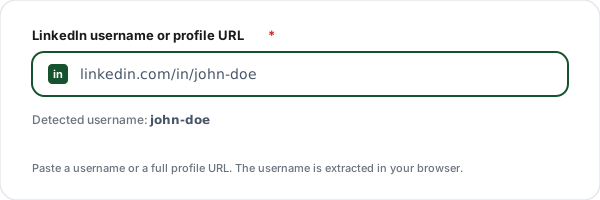
Enter your username or profile URL
Paste your LinkedIn username (the part after /in/) or your full profile URL. The tool detects and extracts the username automatically.
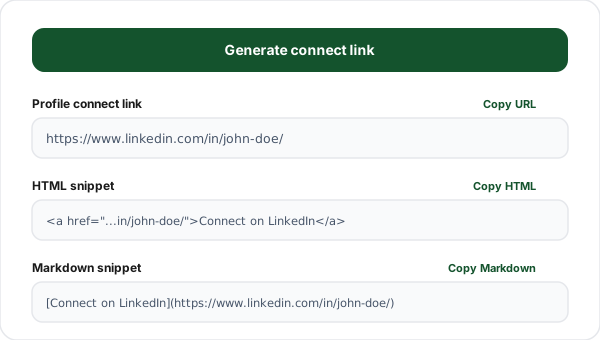
Generate the connect link
Click Generate to build the canonical linkedin.com/in/ profile link, the page with the blue Connect button, plus ready-to-paste HTML and Markdown versions.
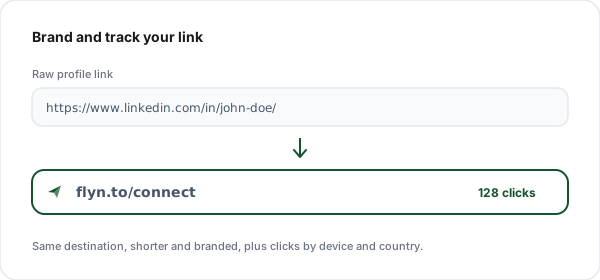
Copy and brand it
Copy the raw URL, the HTML anchor, or the Markdown. Optionally wrap it in a Flyn short link to brand it and track clicks by device and country.
What is a LinkedIn Connection Request Link?
A LinkedIn connection request link is a clean, shareable link to your LinkedIn profile, the one page on LinkedIn where the blue Connect button appears. The canonical format is https://www.linkedin.com/in/your-username/. When someone opens it, they land on your profile and can send you a connection request in a single tap.
Being honest about what is possible: you may have seen tools or LinkedIn posts promising a magic URL that opens the connection box with a pre-written note already filled in. That used to exist, but LinkedIn removed pre-filled invite-with-message URLs years ago to cut down on automated, spammy outreach. There is no official, working endpoint for it today, so we do not pretend to build one. Anything claiming otherwise either does nothing or breaks unpredictably.
The reliable approach, and the one every credible source recommends, is to share your profile link. The person clicks through, sees your photo, headline, and mutual connections, and taps Connect themselves. That extra context actually improves acceptance rates compared with a cold, automated invite. This generator takes a username or any profile URL and produces the clean, canonical link in URL, HTML, and Markdown form.
One upgrade worth making: a raw linkedin.com/in/ link is long and gives you zero data on who clicked. Wrapping it in a short link such as flyn.to/connect makes it memorable in a bio or on a slide, and lets you see total clicks, devices, and countries, while still sending people to your real profile.
Profile Link vs the Deprecated Invite URL
Some tools still advertise a pre-filled invite link. Here is why the plain profile link is the only one that actually works today.
| Aspect | Profile connect link | “Invite with message” URL |
|---|---|---|
| What it opens | Your profile (Connect button) | Nothing, the URL was removed |
| Pre-filled note | No (LinkedIn does not allow it) | Claimed, but does not work |
| Officially supported | Yes, canonical profile URL | No, deprecated by LinkedIn |
| Works on mobile + app | Yes, opens in the LinkedIn app | No |
| Safe to share publicly | Yes | No, may break or look spammy |
| Trackable via short link | Yes (wrap in flyn.to) | N/A |
Where to Use Your LinkedIn Connect Link
Email signature
Add a "Connect with me on LinkedIn" link to your signature so every email you send is a soft networking touchpoint.
Link in bio
Drop your profile connect link in Instagram, TikTok, or a Linktree-style page so followers can find you on LinkedIn in one tap.
Conference and webinar slides
End a talk with a branded short link to your profile so the audience can connect while you are still on stage.
GitHub and portfolio README
Use the Markdown output to add a clean LinkedIn link to your GitHub profile, portfolio, or docs site.
Sales and outreach
Include your profile link in cold emails and proposals so prospects can vet you and connect without searching your name.
Newsletter footer
Wrap the link in a trackable short link to measure which issues drive the most new LinkedIn connections.
Tips for a Higher Connection Acceptance Rate
Set a custom vanity URL first. A clean firstname-lastname username looks far more credible than one ending in random digits. Edit it from your profile under “Edit public profile & URL”, then regenerate your link here.
Add a personal note when you can. Since the pre-filled note URL no longer exists, the highest-acceptance path is for people to click your profile link and add a note manually, or for you to send the invite with a note from the app. A short, specific reason for connecting beats a blank request every time.
Brand the link. A short link such as flyn.to/connect is easier to say out loud on a podcast, print on a business card, or drop in a bio than a long linkedin.com/in/ URL, and it tells you how many people actually clicked.
Use descriptive link text. “Connect with me on LinkedIn” is clearer than a bare URL for both readers and screen-reader users. The HTML and Markdown output here let you set that text without touching the underlying link.
Why Use Flyn's LinkedIn Link Generator?
100% Client-side
The link is built in your browser. Your username and profile never touch our servers.
Honest, working links
We build the real profile connect link, not a fake invite URL that LinkedIn removed.
URL, HTML + Markdown
Copy the raw URL, an HTML anchor for your site, or Markdown for READMEs and docs.
Brand and track it
Wrap it in a Flyn short link to get a memorable URL plus click analytics, for free.
Frequently Asked Questions
What is a LinkedIn connection request link?
A LinkedIn connection request link is simply a clean link to your LinkedIn profile, the page where the blue "Connect" button lives. When someone opens it, they land on your profile and can tap Connect to send you a request. The canonical format is https://www.linkedin.com/in/your-username/. This tool builds that link from either your username or your full profile URL, then frames it as a connect call to action.
Can I create a link that pre-fills a connection invite message?
No, and any tool that claims to is misleading. LinkedIn removed pre-filled invite-with-message URLs years ago for spam reasons, so there is no official endpoint that opens the "Add a note" box with your text already filled in. The honest, working approach is to share your profile link so people can click Connect themselves. That is exactly what this generator produces: a real linkedin.com/in/ profile link.
How do I find my LinkedIn username?
Open your LinkedIn profile and look at the URL in your browser. The username (LinkedIn calls it your "public profile URL" or "vanity URL") is the part after /in/. For example, in https://www.linkedin.com/in/john-doe/ the username is john-doe. You can paste either the full URL or just the username into this tool, it extracts the username automatically.
Why does my profile link have random numbers in it?
If your URL looks like linkedin.com/in/john-doe-8a2b1c4d, you have not set a custom vanity URL yet. LinkedIn lets you change it: go to your profile, click "Edit public profile & URL" in the top right, then edit the URL under "Edit your custom URL". A clean username (firstname-lastname) is more memorable and looks more professional in bios and signatures.
What output formats does this generator give me?
Three formats. The raw URL (https://www.linkedin.com/in/username/) for pasting anywhere. An HTML anchor (<a href="..." target="_blank" rel="noopener noreferrer">Connect with me on LinkedIn</a>) for embedding on a website or email signature. And a Markdown link ([text](url)) for READMEs, GitHub profiles, Notion, and docs. Pick whichever fits where you are posting.
Is this link safe to put in my email signature or bio?
Yes. It is just a standard link to your own public LinkedIn profile, the same URL you would copy from your browser. It does not log anyone in, does not request permissions, and works on desktop and the LinkedIn mobile app. If a visitor has the LinkedIn app installed, most phones open the link directly in the app where they can tap Connect.
Does the link work on mobile and inside the LinkedIn app?
Yes. On a phone, tapping a linkedin.com/in/ link usually opens the LinkedIn app straight to your profile if it is installed, otherwise it opens in the mobile browser. Both show the Connect button. There is no special mobile syntax needed, the same profile URL works everywhere, which is one reason the deprecated invite-message URLs are not worth chasing.
Should I use my profile link or a company page link?
For a personal connection request, use your profile link (linkedin.com/in/username). The Connect button only appears on individual profiles. Company pages have a "Follow" button instead, not Connect. If you want people to follow your company, build the company URL (linkedin.com/company/name) separately, this tool is for personal profile connect links.
How can I track how many people click my LinkedIn link?
A raw linkedin.com/in/ link gives you no click data. Wrap it in a short link (for example flyn.to/connect) and you get a clean, branded URL plus analytics: total clicks, device, browser, and country. The destination stays your real profile, you just gain visibility into how your bio, newsletter, or signature is performing. Flyn does this for free.
Can I customise the link text?
Yes. The "Link text" field controls the visible words in the HTML and Markdown output, the underlying URL stays the same. Common choices are "Connect with me on LinkedIn", "Let us connect", or "Add me on LinkedIn". For accessibility, keep the text descriptive so screen-reader users know where the link goes rather than seeing a bare URL.
Why does the URL end with a trailing slash?
The canonical LinkedIn profile URL format is https://www.linkedin.com/in/username/ with a trailing slash, which is what LinkedIn itself uses and redirects to. The link works with or without the slash, but matching the canonical form avoids an extra redirect hop and keeps things tidy. This tool always outputs the canonical, www, https form.
Do you store the username or profile I enter?
No. Everything happens in your browser. The tool reads your input, extracts the username, and builds the link locally using JavaScript, nothing is sent to or stored on our servers. Your recent links are saved only in your browser localStorage so you can reuse them, and you can clear that history at any time with one click.
Related Tools
LinkedIn Share Link Generator
Build a one-click "Share on LinkedIn" link that pre-fills a post with your URL.
Click to Tweet Link
Create a tweet-this link with your message and link pre-filled, perfect for blogs.
URL Shortener
Brand and shorten any link, including your LinkedIn profile, and track every click.
UTM Builder
Tag links with UTM parameters so your LinkedIn traffic shows up cleanly in analytics.
Ready to level up your links?
Use our free tools to build social and contact links, then wrap them in Flyn short links to see how many people actually click through to your LinkedIn profile.