Free Bluesky Share Link Generator
Build a bsky.app compose link that opens Bluesky with your text, URL, and hashtags already typed. Live 300 character counter, ready HTML button, and your draft stays in your browser.
Everything runs in your browser. Your draft never reaches our servers, and history stays in this browser only.
Bluesky trims your URL down to a stub.
The composer counts a long URL as your domain plus about 16 characters, and the client runs the same trimming again when the post is created, so the published text is a stub like www.example.com/blog/some-lo... A Flyn short link costs about 14 characters, stays readable end to end, and counts the clicks.
How to Create a Bluesky Share Link in 3 Steps
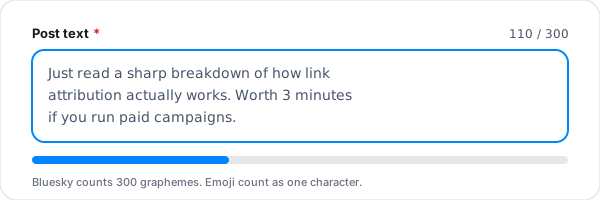
Write the post text
Type the message you want waiting in the composer when someone taps your button. The counter tracks it against Bluesky's 300 character limit in real time, and the bar turns amber when you get close.
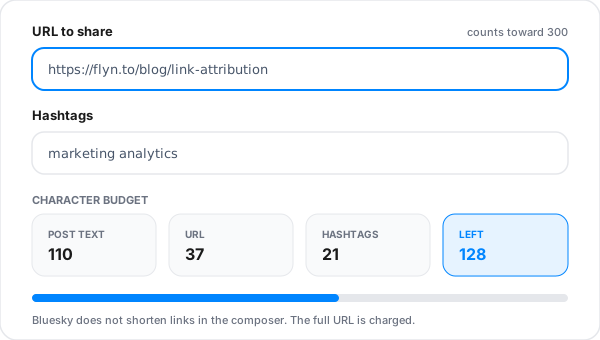
Add the URL and hashtags
Paste the link you want shared and add optional hashtags. Both land inside the same text parameter, so the budget breakdown shows how many characters each piece is costing you.
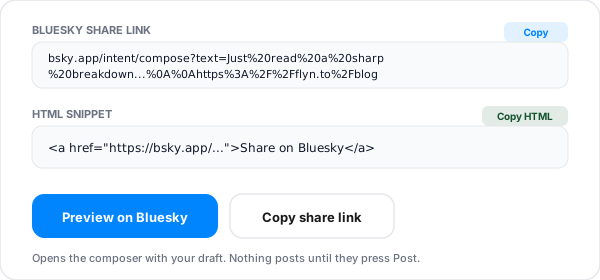
Copy the link or the HTML button
Copy the bsky.app/intent/compose URL for anywhere a link goes, grab the ready HTML anchor for your site, or press Preview on Bluesky to watch the composer open with your draft already in it.
What Is a Bluesky Share Link?
A Bluesky share link is an ordinary https URL that opens the Bluesky composer with a draft already typed in it. The whole thing is one address: https://bsky.app/intent/compose?text=.... Click it and Bluesky opens, the composer appears, and the message is sitting there waiting. Nothing is published until the person reads it and presses Post.
This pattern is usually called an intent link, and it is the same idea social platforms have used for years to power "share this" buttons. The value is friction removal. A reader who has to open an app, start a post, hunt down your URL and think of something to say usually gives up somewhere in the middle. A reader who taps once and sees a finished sentence they can tweak in two seconds usually posts.
The design of the endpoint is deliberately minimal. There is exactly one parameter you can use, text, and everything you want in the draft has to be inside it, URL-encoded. There is no separate field for a link, no usable field for media, and no field to credit an account. That simplicity is why the link is so reliable across the web app, the iOS app, and the Android app, and it is also why the character budget matters so much.
The limit is 300 graphemes, so an emoji or an accented letter counts as one, not several. Your URL counts too, but not at its full length. Bluesky's own client trims link text before it measures it: toShortUrl drops the scheme and, once the path runs past 15 characters, keeps only its first 13 followed by an ellipsis. A URL therefore costs roughly the length of your domain plus 16 characters, however long the real address is, and the complete URL is still carried on the post as a link facet so it resolves normally.
That changes the advice, it does not remove it. The same trimming runs again when the post is created, so what readers see in the published post is a cut-off stub rather than a readable address. The trimming lives in Bluesky's own client, so a post created straight through the AT Protocol API carries the text you send it, at full length. The same text field also carries a 3000 byte ceiling, so graphemes is the limit you are likely to hit first, not the only limit there is.
Anatomy of a bsky.app Compose Intent URL
Four pieces to know. If a snippet you copied from somewhere else has a url= or via= parameter in it, it was written for a different network. Neither appears in Bluesky's documented compose intent.
| Piece | Role | What to know |
|---|---|---|
| https://bsky.app | Host | The host Bluesky documents for the compose intent. Do not swap in a PDS hostname or a custom domain handle, those serve the AT Protocol, not the web app UI. |
| /intent/compose | Path | The route that opens the Bluesky composer in intent mode. Hitting it with no parameters simply opens an empty composer. |
| ?text= | Draft text | Everything you want in the draft goes here as a single URL-encoded string. Bluesky's docs list this one and nothing else: "The web URL endpoint is https://bsky.app/intent/compose, with the HTTP query parameter text." The docs list no url, hashtags, or via parameter, whatever a copied snippet claims. |
| %20 %0A %23 | Encoding | Spaces become %20, newlines become %0A, and a hash symbol becomes %23. Skip the encoding and a raw # or & cuts your draft off at that character, while raw newlines vanish entirely and run your lines together. A raw space survives inside an href because the browser encodes it for you, but it will still cut the link short anywhere the URL is pasted as plain text. |
A finished example
https://bsky.app/intent/compose?text=Just%20read%20a%20sharp%20breakdown%20of%20link%20attribution.%0A%0Ahttps%3A%2F%2Fflyn.to%2Fblog%0A%0A%23marketingThat decodes to a sentence, a blank line, the URL, another blank line, and one hashtag. 82 characters as typed. Run the client's trimming rule over it, as our counter does, and it comes to 74, because the https:// on the link is dropped before measuring, leaving 226 for whoever clicks it to add their own take.
What Counts Toward Bluesky's 300 Characters
Bluesky enforces 300 graphemes per post. A grapheme is what a person sees as a single character, so an emoji is one, not four. Everything you put in the compose intent shares that one budget.
| Element | Counts? | Detail |
|---|---|---|
| Post text | Yes | Every visible character, including spaces and line breaks. |
| The URL you append | Yes, but trimmed | The composer counts a trimmed version, not the whole string. Its toShortUrl drops the scheme and returns "urlp.host + path.slice(0, 13) + '...'" whenever the path runs past 15 characters, so the cost is your host plus 16 characters however long the address is. The full URL stays in the post's link facet, so the link still works and still looks like a link. |
| Hashtags | Yes, hash included | Three tags at ten characters each is 10 percent of the budget gone before you write a word. |
| Emoji | One grapheme each | Bluesky counts what a human sees as one character. Flags and skin tones are the edge cases. |
| Line breaks | Yes | Each newline is one character, and it is encoded as %0A inside the link. |
| Link cards | No | The trimmed URL text still counts toward the 300. |
Our counter is a reimplementation of the trimming rule published in Bluesky's client source, not a reading taken from a live composer, so treat the total as a close guide and leave yourself headroom. Differences we know of: it walks code points rather than graphemes, so a flag or skin tone emoji may read as two here where Bluesky reads one, and it only trims text that carries an http:// or https:// prefix, so a bare domain typed into the post text box is counted in full.
Share Link vs Shortened Bluesky Link
These two tools get confused constantly because both involve Bluesky and a link. They point in opposite directions. If you want to compress a bsky.app URL for sharing elsewhere, you want the Bluesky link shortener instead.
| Aspect | Share link (this tool) | Shortened link |
|---|---|---|
| Direction of travel | Sends people into Bluesky with a draft ready | Sends people out of Bluesky to your destination |
| Where it belongs | Your website, blog, newsletter, docs, thank you page | Your own Bluesky posts, bio, and starter packs |
| What the reader does | Reviews the prefilled text and presses Post | Taps and lands on your page |
| Analytics | None from Bluesky, wrap it in a short link to count clicks | Full click counts, with device and country on Pro |
| Character impact | The link is the whole point, 300 char budget applies | Saves characters inside your own posts |
The two work well together. Shorten your destination first, then drop the short link into the share text. You spend fewer characters, and you get a click count, which Bluesky itself does not report back to you.
Where a Bluesky Share Button Earns Its Place
Blog post "share this" buttons
Put the headline plus the canonical URL in the draft so readers who share repeat the same framing instead of writing "interesting read".
Newsletter forward CTAs
A share link in the footer of an issue converts readers into distributors. Email clients handle plain https links cleanly, no app deep link weirdness.
Post-signup thank you pages
The moment right after someone converts is the highest intent moment you will get. A prefilled "just joined" draft catches it.
Changelog and release notes
Ship a share link next to each release entry with the version number already in the text, so shares stay searchable and specific.
Docs and support articles
Let people share the exact page that unblocked them. The URL in the draft is the deep link, not your homepage.
Event and webinar pages
Prefill the date and the registration link so attendees can invite their followers in one tap without retyping details.
Bluesky Share Link Best Practices
Six things that separate a share button people actually use from one that gets ignored.
Shorten the URL before you build the link
The composer counts a trimmed stub rather than the whole address, so a short link saves fewer characters than it looks: a trimmed long URL costs your domain plus 16, a flyn.co link costs 14. The bigger wins are that readers see a complete, readable address instead of a cut-off one, and that you get a click count, which Bluesky does not hand you.
Write in the sharer's voice, not yours
The draft is published by them, from their account. "We just launched" reads wrong in a stranger's feed. Write something a reader would plausibly say out loud.
Leave headroom under 300
Aim for roughly 260 characters. People edit the draft before posting, and a composer that is already full blocks them from adding their own take, which is the part their followers care about.
Put the URL on its own line
A blank line before the link keeps the message readable in the composer and keeps the link card preview tidy once the post goes out.
Test the encoded link before shipping it
Click your own button once on desktop and once on a phone. Double encoded text and stray unescaped ampersands only reveal themselves in a real composer.
Do not stuff hashtags
Bluesky discovery leans on feeds and follows more than tags. Two focused tags help, six make the post look automated and burn characters you needed for the point.
Why Use Flyn's Bluesky Share Link Generator?
Honest 300 counter
Text, URL, and hashtags counted together, with the link trimming rule from Bluesky's client source applied before the total. See where your 300 characters are going before you ship the button.
100% client side
Your draft never leaves the browser. We do not receive your text and nothing you type is logged, so it is safe for unannounced launches.
HTML snippet included
Copy a ready anchor tag with target and rel already set, paste it into any CMS, done.
Pairs with click tracking
Wrap the intent URL in a Flyn short link to finally see how many people tap your share button.
Frequently Asked Questions
What is a Bluesky share link?
A Bluesky share link is a normal https URL that opens the Bluesky composer with a draft already typed. The address is https://bsky.app/intent/compose?text= followed by your URL-encoded message. Bluesky calls these intent links, the same idea as the classic tweet intent or the LinkedIn share URL. The person clicking it still reads the draft and presses Post themselves, nothing is published automatically.
Why put a share link on my website instead of a plain link to my profile?
A profile link asks the reader to do the work: open Bluesky, start a post, find your URL again, write something. A share link collapses all of that into one tap and lands them in a composer that already says what you want said. Fewer steps between the impulse and the post, and the wording of those shares stays consistent, which matters when you are trying to get a specific phrase or product name repeated.
Does the 300 character limit include the URL I append?
Yes, but not at full length. The compose intent gives you exactly one usable parameter, text, so your link is part of the message body. Bluesky's own client trims link text before it counts it: toShortUrl in social-app drops the scheme and, once the path runs past 15 characters, keeps only its first 13 followed by an ellipsis. A URL therefore costs roughly your domain plus 16 characters. Apply that rule to the 72 character link https://www.example.com/blog/some-long-post-slug?utm_source=bluesky&i=1x and you get www.example.com/blog/some-lo..., which is 31 characters. Our counter reimplements that trimming rule before it counts, so it charges the link 31 too.
Does Bluesky shorten links inside the compose intent?
For counting and for the published post, yes. The official client measures a shortened copy of the draft, defined in social-app as "function getShortenedLength(rt: RichText) { return shortenLinks(rt).graphemeLength }", and that shortened length is what the composer's counter shows and what the Post button is gated on. The same shortenLinks call runs again when the post is created, so the text that goes into the record is the trimmed stub, while the complete URL is carried alongside it in the post's link facet so it still resolves. What Bluesky does not give you is a short address you can paste elsewhere, or any click data. The trimming lives in that client, so a post created straight through the AT Protocol API carries the text you send it, at its full length.
Does the share link work in the Bluesky mobile app or only on the web?
It works in both, with a caveat. On desktop the link opens bsky.app in the browser and drops the text straight into the composer. On mobile, iOS and Android hand bsky.app URLs to the installed Bluesky app through Universal Links and App Links, so the app composer opens with your draft. If the app is not installed, the mobile browser opens the web composer instead, and the text still arrives.
Can I prefill an image, video, or GIF?
No, not from a share link on your site. Bluesky's docs list a single parameter: "The web URL endpoint is https://bsky.app/intent/compose, with the HTTP query parameter text." The app's intent handler also reads imageUris and videoUri, which are undocumented, but in the client source an image URI containing http:// or https:// is discarded and images are passed through on native builds only, which rules out pointing a web share button at a hosted image. If you need an image in the post, attach it manually after the composer opens, or publish through the AT Protocol API with your own client, which uploads the blob first and then creates the record.
Can I schedule a post with a share link?
Not with an intent link. A share link does nothing until a human clicks it, so there is no moment in time to schedule. Scheduling requires either a third party tool that holds an app password and posts on your behalf, or your own AT Protocol integration. Share links solve distribution, not timing.
How is this different from a shortened Bluesky link?
They point in opposite directions. A share link sends people INTO Bluesky with a draft ready to publish, so it belongs on your website, in your newsletter, or at the end of a blog post. A shortened link sends people OUT of Bluesky to your destination, so it belongs inside your own posts and bio. Use our Bluesky link shortener for that second job, and use this generator for the first.
Do emoji count as one character on Bluesky?
Bluesky counts graphemes, which is the technical term for what a human sees as one character, so a standard emoji counts as one and an accented letter counts as one. Our counter walks code points instead, which means a flag or a skin tone emoji can read as two here where Bluesky reads one. Leave a little headroom if your draft is full of those.
Do I need a Bluesky account or an API key to use this?
Neither. The generator builds a URL string in your browser, it never talks to Bluesky, and there is nothing to authenticate. You only need an account at the moment someone actually clicks the link and posts, and that account belongs to them, not to you. Nothing here touches the AT Protocol, app passwords, or OAuth.
Can I include hashtags, and do they become clickable?
Yes. Type them in the hashtags field without the hash symbol and we normalise and append them. Bluesky parses hashtags at post time and turns them into tappable facets, so they become real clickable tags in the published post. Two or three focused tags outperform a wall of them, and remember each one eats into the same 300 characters.
What happens if the person clicking is logged out?
Bluesky shows the sign in screen first. Whether the draft survives the login round trip depends on the client and the session state, so treat a logged out click as a lower probability share. This is a good argument for putting the share button where your logged in Bluesky audience already is: your newsletter, your docs, your thank you page after a signup.
Can I track how many people click my Bluesky share button?
Not from Bluesky, which does not report intent clicks back to you. The workaround is to point your button at a Flyn short link that redirects to the bsky.app intent URL. Flyn counts the clicks, so you learn which page, newsletter, or docs section drives shares, and the composer still opens with your text intact.
Does my draft text get sent to Flyn or stored anywhere?
No. Everything on this page is built with client side JavaScript. Your text, URL, and hashtags never leave the browser, and there is no server log of what you typed. Pressing Build does fire one product analytics event, and its payload is the tool name and the word generate, with nothing from your draft in it. Every successful Build is also saved to a history list in your browser localStorage, capped at the last twenty entries, which you can clear from the panel.
Why is my link breaking when I paste it into an email tool?
Almost always double encoding. The text parameter is already percent encoded, so a tool that helpfully encodes the whole href a second time turns %20 into %2520 and the composer fills with garbage. Paste the link exactly as generated, and if your email or CMS editor mangles it, use the HTML snippet we output instead of retyping the href.
Related Tools
Build the share button here, then shorten what it points at.
Bluesky Link Shortener
The other direction: turn long bsky.app profile, post, and starter pack URLs into short trackable links.
LinkedIn Share Link Generator
Same share button idea for LinkedIn, with its own quirks around what you can and cannot prefill.
Telegram Share Link Generator
Build t.me share links with a prefilled message for channels, groups, and direct chats.
Reddit Submit Link Generator
Prefill a Reddit submission with a title, target subreddit, and URL in one click.
Shorten the link, then count the clicks
Shorten the destination first, drop it into your share text, and get the click count Bluesky does not give you. Free click counts and QR codes, with analytics breakdowns and custom domains on Pro.
Tip: two focused hashtags beat six generic ones on Bluesky.