Free Pinterest Save Button Generator
Build a Pin it / Save link and the official Save button HTML embed from any page URL, image, and description. Copy the link or the code, 100% in your browser.
The Save link opens Pinterest's pin composer pre-filled with your page, image, and caption. The user can still edit the description and pick a board before saving, that is by design. If you omit the image URL, Pinterest lets the user choose any image found on the page instead.
Track how many people save your pins
Wrap your Save link in a Flyn short link to see who clicked, from where, on what device, without changing where the button sends them.
How to Create a Pinterest Save Button in 3 Steps
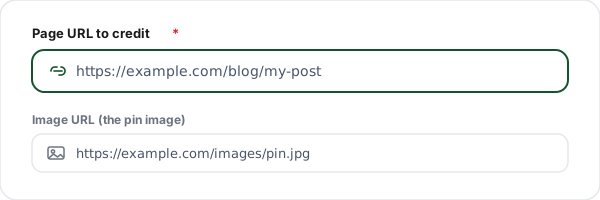
Enter the page and image
Paste the page URL you want credited as the source and the image URL you want people to pin. Add an optional description that becomes the default caption.
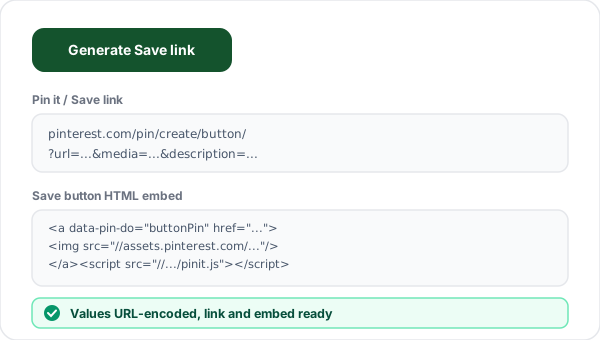
Generate the Save link and embed
Click Generate. We build the pin/create/button/ Save link with your values URL-encoded, plus the official data-pin-do button HTML and the pinit.js script tag.
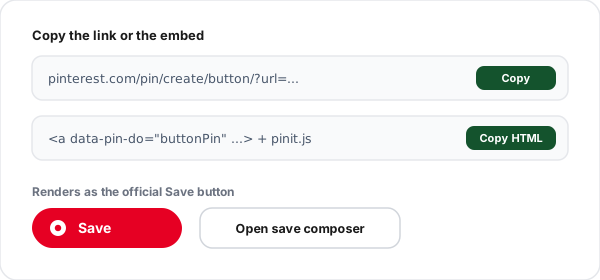
Copy the link or HTML
Copy the Save link to paste into a button, email, or CMS field, or copy the HTML embed to drop the official red Save button onto your site.
What is a Pinterest Save Button?
A Pinterest Save button (originally the "Pin it" button) is a one-click way for a visitor to save an image from your page to one of their Pinterest boards. Clicking it opens Pinterest's pin composer with your page URL, image, and caption already filled in, so the user just picks a board and saves. Every save re-shares your content to that user's followers, which is why Pinterest is such a durable, compounding traffic source.
Under the hood, the button is just a link to Pinterest's public save endpoint: https://www.pinterest.com/pin/create/button/ with three query parameters, url (the source page), media (the image to pin), and description (the default caption). No API key, app, or developer account is needed; the endpoint is open to everyone.
You can use that link two ways. Paste it as a plain URL behind your own styled button, in an email, or in a CMS field. Or use the official widget: an anchor tagged with data-pin-do="buttonPin" plus the pinit.js script, which Pinterest converts into its branded red Save button automatically. This generator produces both at once so you can choose whichever fits your site.
The one limitation worth knowing: the description and board are defaults, not locks. Pinterest intentionally lets the user edit the caption and pick their own board before saving, that keeps pins personal and on-policy. Write a clear, keyword-led default and most people will keep it, which is good for your Pinterest search visibility.
Pinterest Save Link Parameters
Every Save link points at pinterest.com/pin/create/button/. The first parameter starts with ?; the rest are joined with &. All values must be URL-encoded, which this tool handles for you.
| Parameter | Required | Purpose | Example |
|---|---|---|---|
| url | Required | The page credited as the source of the pin. Pinterest links the saved pin back to this URL. | ?url=https%3A%2F%2Fexample.com%2Fpost |
| media | Optional | The image to pin. Strongly recommended so the user pins exactly the image you intend. Use a tall 2:3 image. | &media=https%3A%2F%2F...%2Fpin.jpg |
| description | Optional | The default pin caption. The user can edit it before saving. Lead with your key topic and keywords. | &description=My%20best%20recipe |
Where to Use a Save Button
Blog post images
Add a Save button beside every in-post image so readers can pin your charts, recipes, or infographics straight to their boards.
Product pages
Let shoppers save a product photo to a "wish list" board, pre-filled with the product page URL and a clean caption.
Recipe and food sites
Recipe cards are the most-pinned content on Pinterest. A Save button on each card drives repeat traffic for years.
Portfolio and design work
Give visitors a one-click way to save your designs, with the image and credit link baked into the pin.
Email newsletters
Drop the plain Save link into an email so subscribers can pin your featured image without leaving their inbox flow.
Infographics
Tall infographics are pin gold. A Save link pointed at the full-resolution image maximises re-shares.
Save Link vs HTML Embed
Both come from the same endpoint and pre-fill the same image and caption. The plain link gives you styling freedom and works in email; the HTML embed gives you Pinterest's official red button with no CSS. This tool outputs both.
| Aspect | Save Link | HTML Embed |
|---|---|---|
| Setup | Paste one URL anywhere | Paste anchor + pinit.js script |
| Styling | Style your own button freely | Official red Pinterest button |
| Requires JavaScript | No | Yes (pinit.js) |
| Pre-fills image + caption | Yes (media + description) | Yes (same parameters) |
| Works in email | Yes | No (scripts are stripped) |
| Best for | Custom buttons, email, CMS fields | Branded button on a webpage |
Why Use Flyn's Save Button Generator?
100% Client-side
The link is built in your browser. Your page and image URLs never touch our servers.
Link + official embed
Get the plain Save link and the data-pin-do button HTML with the pinit.js script in one go.
Correct encoding
Page, image, and description are URL-encoded properly, no broken pins from stray spaces or symbols.
Works everywhere
Paste the link in email, a CMS, or a custom button, or use the widget for the branded red button.
Frequently Asked Questions
What is a Pinterest Save button?
A Pinterest Save button (historically called the "Pin it" button) is a link or widget that lets a visitor save an image from your page to one of their Pinterest boards in a couple of clicks. Clicking it opens Pinterest's pin composer pre-filled with your page URL, the chosen image, and an optional description. It is the simplest way to turn page visitors into people who re-share your content across Pinterest.
What URL does this generator build?
It builds Pinterest's official save endpoint: https://www.pinterest.com/pin/create/button/?url=PAGEURL&media=IMAGEURL&description=DESC. The url parameter is the page credited as the source, media is the image to pin, and description is the default caption. All three values are URL-encoded automatically. This is the exact endpoint Pinterest's own Save button widget calls, so the link works pasted anywhere on its own.
What is the difference between the Save link and the HTML embed?
The Save link is a plain URL you can paste into a button, an email, a sidebar, or a CMS field. The HTML embed is an anchor tag with data-pin-do="buttonPin" plus the pinit.js script tag, which Pinterest turns into its branded red Save button automatically. Use the link when you want full control over styling; use the embed when you want the official Pinterest-styled button with zero CSS.
Do I need a Pinterest developer account or API key?
No. The save endpoint and the pinit.js widget are public and require no API key, app registration, or developer account. Anyone can build the link or paste the embed. This tool is fully client-side, your page URL and image URL never touch our servers, the link is assembled in your browser.
Is the image URL required?
For a clean one-image pin, yes, include the media parameter so the user pins exactly the image you intend. If you leave the image URL blank, the link still works: Pinterest scans your page and lets the user choose any image it finds. For predictable results, especially on pages with several images, always specify the image URL.
What image size works best for Pinterest pins?
Pinterest favours tall, vertical images. The recommended aspect ratio is 2:3, for example 1000 by 1500 pixels. Square or very wide images get cropped or down-ranked in the feed. Use a high-resolution, public image URL (no login wall), because Pinterest fetches the image directly when the pin is created.
Can the user still edit the description before saving?
Yes. The description you pass is only a default. When the composer opens, the user can edit the caption and choose which board to save to before confirming. That is intentional, Pinterest wants pins to feel personal. Write a clear, keyword-rich default so most users keep it as-is.
How long should the pin description be?
Keep it focused. Pinterest displays roughly the first 500 characters, but the first sentence matters most for both users and Pinterest search. Lead with the key topic and a couple of relevant keywords, then add context. Avoid hashtag spam; one or two relevant terms are plenty.
Where do I paste the HTML embed on my site?
Paste the anchor tag wherever you want the button to appear, next to an image, at the end of a post, or in a floating share bar. Then include the pinit.js script tag once, ideally right before the closing body tag. The script scans the page for anchors with data-pin-do="buttonPin" and converts each one into the official Save button.
Does the Save button work on mobile?
The save link works everywhere: tapping it on mobile opens the Pinterest app if installed, or the mobile web composer otherwise. The pinit.js hover button is a desktop pattern, on touch devices the rendered button still works as a tap target. For mobile-first sites, many people prefer the plain Save link styled as their own button rather than the widget.
Can I track how many people save my pins?
The save endpoint itself does not report clicks back to you. To measure interest, wrap your Save link in a Flyn short link: every click is counted with country, device, and referrer, and the user still lands on the Pinterest composer. That turns an invisible button into a measurable channel without changing what the user experiences.
Will the Save link expose anything private?
No. The link only contains the public page URL, public image URL, and the caption you choose, all of which are meant to be shared. Nothing is sent to Flyn's servers; the link is built locally in your browser. Only point the image and page parameters at publicly reachable URLs, since Pinterest needs to fetch them.
Is the old "Pin it" button the same as the Save button?
Yes, they are the same feature. Pinterest renamed "Pin it" to "Save" in 2016, but the underlying endpoint (pin/create/button/) and the pinit.js widget are unchanged. You will still see both names in older tutorials. This generator produces the current, working format under either name.
Related Tools
Facebook Share Link Generator
Build a Facebook sharer link for any page and copy it as a URL, HTML, or Markdown.
Reddit Link Shortener
Shorten and brand links you post to Reddit, and track every click from each subreddit.
URL Shortener
Shorten your Save link and track clicks: how many, from where, on what device.
Pinterest Link Shortener
Brand and shorten the links in your pins and bio, then see exactly how many people click.
Ready to level up your links?
Use our free tools to build share and save links, then wrap them in Flyn short links to get click analytics, see how many people actually save your pins and share your pages.